

Building AI agents with Splunk MCP Server
MCP—model context protocol—enables LLMs to connect to services so that you can create AI agents to complete more custom tasks. It is a lightweight, secure, two-way connection bridge to access external tools, databases, and functions. It converts requests from AI models into requests that those other services can understand and then translates those results back again. secure two-way connectors between data and AI tools. The two main parts are:
MCP Client
- Connects to MCP Server through JSON-RPC 2.0 messaging
- Integrates to LLM models and orchestrates
- Handles user request/responses
- Examples: Claude Desktop, gemini-cli, Amazon-Q
MCP Server
- Connects to tools/functions
- Security gateway
- Examples: Splunk MCP Server, AWS MCP Servers, Github MCP Servers
A sample workflow is show in the following diagram.
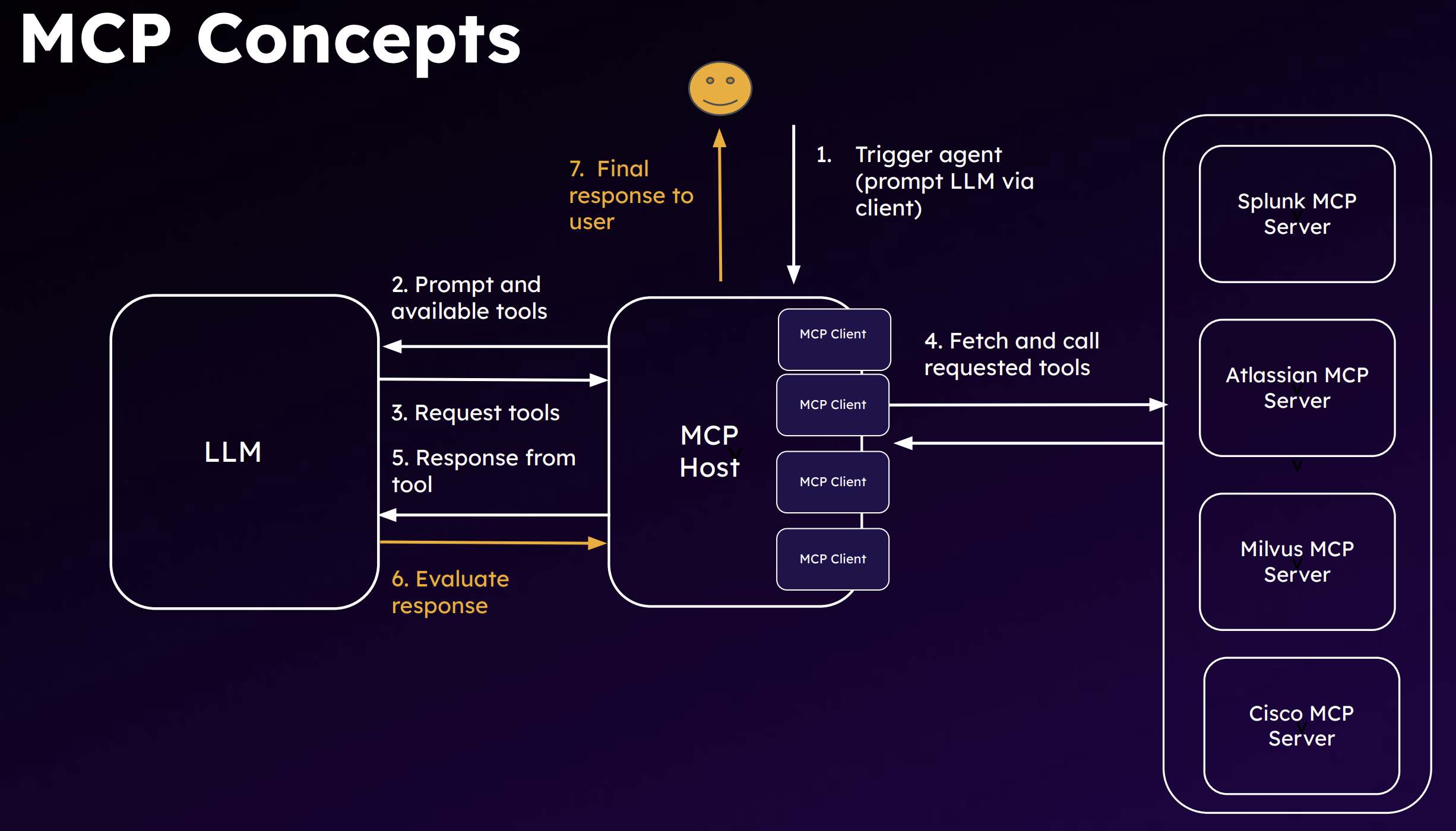
MCP enables an agentic workflow that moves your use of artificial intelligence from reactive to proactive to continuous improvement.The following are characteristics of AI agents:
- Autonomous: The ability to function independently, make decisions, and execute actions without constant human oversight. They have a trigger that sets off a workflow,, such as following a guidebook to hunt for threats.
- Adaptable:The capacity to adapt to new data, learn from experience, and improve performance over time.
- Goal-oriented: The ability to set goals, plan and run actions to achieve those goals, and interact with the environment and external systems via tools and APIs. Agents can divide a goal into sequenced steps.
What makes AI agents proactive and capable of continuous improvement are their design patterns. They can be thought of as worker units that leverage generative AI reasoning to automate specific tasks through the following capabilities:
- Plan: LLMs use reasoning to decide a sequence of steps.
- Use Tools: Leverage external functions for additional context. Connect to services and SaaS components and coordinate with them.
- Collaborate:Solve complex tasks by calling and orchestrating several small agents.
- Reflect: Self-evaluate responses and make necessary corrections through a feedback loop.
The next diagram is an example of a react agent. It has three main components:
- LLM: The brain
- Tools: The hands. They touch services and APIs and MCP servers.
- Environment: The context. The loop on the right is the reasoning process the agent goes through with inputs from the environment. This reasoning ability is what makes an agent different from a program.
Note that memory is missing from this diagram. Shared memory can help agents improve and become more optimized.It is a common component that will be covered later in this article.

This remainder of this article explains key considerations in building agents and what your MCP server options are with Splunk..
How to use Splunk software for this use case
Agents
Inputs
- Objective: What do you need the agent for? The use cases are endless: security, data, ITOps, analysis, and many more.
- LLM: Evaluate your system needs and requirements. Some options are PydanticAI, OpenAI, LLama Index, and LangChain. The main consideration is making sure that it can break down the tasks and look at what needs to be done, which also requires you to be able to write good prompts, but you should also consider the following:
- Size versus capabilities versus use case performance
- Context window versus API cost versus latency
- Open-source versus proprietary
- Customization approaches
- Budget and number of tokens you have
- Tools: What web applications, APIs, or MCP servers the LLM will use. Consider the following regarding tool calling:
- Input robustness
- Flexibility (scenario planning)
- Security (safe code execution)
- Discoverability
- Observability
- Type: Will it be a simple reflex agents that operates on trigger and flow? Or will it be a more advanced learning agent that tries to figure out a plan? The next section goes into this in more detail.
Agent control flow
Control flow is a matter of how much control logic you will give the agent. Or, in other words, how many of your environment will be human-driven versus agent-executed.
In the router version, shown on the left in the following diagram, the agent only has an option of step 2 or 3. However, in the fully autonomous version on the right, it decides what each step is going be.

The more autonomous the agent is, the more guardrails you want to establish. You don't want the agent to go through 100 steps unnecessarily because that's a lot of resource use. The perception module can use memory to decide to not to go through an entire loop again when it's the same issue that occurred last week. The feedback and learning loop can also enhance the agent's planning process.

Other guardrails to consider include:
- Human-in-the-loop
- Input/output validation
- Access controls
- Content filtering
- Rule-based threat protection
- Drift monitoring
Multi-agent architectures
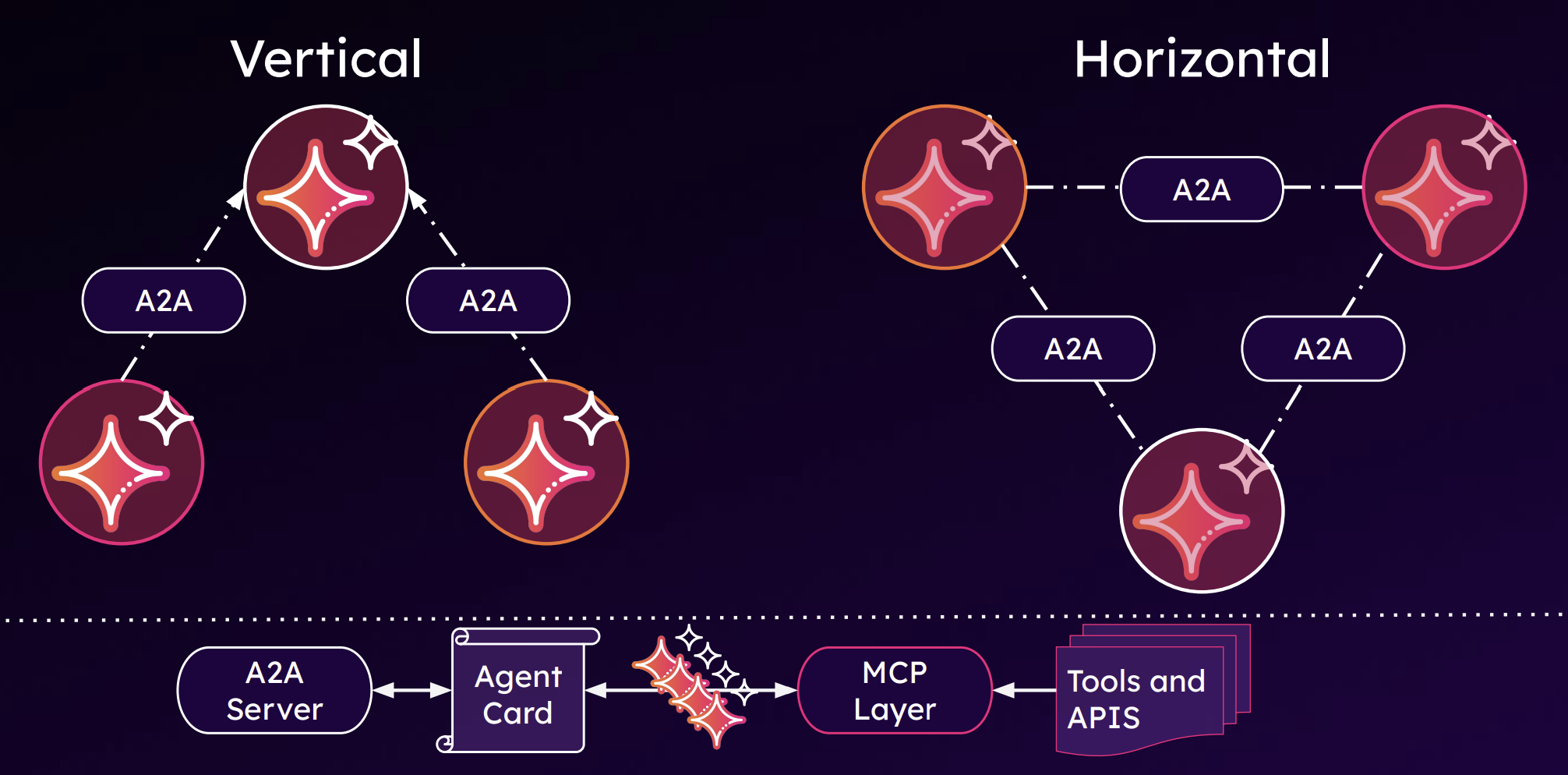
Multi-agent architectures are what will truly empower autonomous networks, and there are many ways to architect multiple agents, but the most basic way is to consider the following two.
- Vertical has a teacher/orchestrator
- Horizontal is symbiotic, no hierarchy for execution
Both use agent-to-agent (A2A) communication, shown in the bottom of the diagram below.
When building a multi-agent architecture, consider the following:
- Pros: Scalability, adaptability, collaboration, efficiency, and autonomous decision-making
- Cons: Coordination complexities, Human-agent interactions (where does the human belong?), security, lack of standardization (though A2A is improving this drawback), and resource intensive (which is probably the biggest con)
Productionizing your agents
Finally, before putting your agents into production, and while in production, you want to monitor their performance, like you would with any other technology you use. Some best practices to implement in your agent use include:
- Observability and monitoring: Using Splunk Observability Cloud for GenAI
- Unit testing
- Containerization
- Tool restriction
- Use of an orchestrator
- Feedback loop: Generator LLM and an Evaluator LLM for responses

Servers
Splunk gives you two server options, described in the following table.
| On-Cloud | Splunk MCP Server App | |
|---|---|---|
| Availability | Controlled Availability July 2025 | Preview at .conf 2025 |
| Deployment Method | Configuration | Splunkbase App |
| Cardinality | 1 MCP Server : n Deployments (1 Region) | 1 MCP Server : 1 Deployment |
| Value Proposition | Use Splunk + Ecosystem’s AI + Agentic solution |
Use Splunk + Ecosystem’s AI + Agentic solution |
| Compatibility | Splunk Cloud Platform only | Splunk Cloud Platform and Splunk Enterprise |
| Pros |
|
|
| Architecture Diagram |  |
 |
Security risks
MCP servers have some risks that traditional API security cannot address. If you use the On-Cloud version of the Splunk MCP Server, Splunk takes care of the security risks. You only need to manage your MCP client, authorization with bearer tokens, and who can access what data in the Splunk platform with role-based access control. However, if you use the on-premises app version, you need to secure both your MCP server and your deployment by following best practices for securing your environment. The following is a brief overview of some processes you will want to establish for MCP server security.
Tool poisoning
This is a manipulation of tool descriptions or parameters to introduce harmful behaviors. They are bad instructions that are invisible to the user but visible to the LLM.
You can protect against this with:
- Tool behavior monitoring
- Sandbox execution
- Allow-listing acceptable executions
Data exfiltration
This can happen in many ways, but one example of this is invisible prompt injection.
You can protect against this with:
- Output filtering (data loss prevention integration)
- Response size monitoring
Command and control
One example of this is malicious MCP servers distributed by an open tool hub. The servers altered task logs and response formatting to avoid triggering audit tools. Another way is a rug pull, in which a set of MCP tools seems legitimate, but suddenly becomes malicious alter widespread adoption.
You can protect against this with:
- Network segmentation
- Supply chain security
- Tool isolation and secure tool registry
- File integrity monitoring
Identity and access bypass
Misconfigured access logic in the server can lead to exposure of data.
Oauth token theft, can lead to impersonation of MCP server. Uses OAuth2
You can protect against this with:
- Enhanced OAuth implementation
- Role-based access control for data access
- Just-in-time access provisioning
Next steps
Now that you have an idea of how to build an AI agent with the Splunk MCP server, it's time to see how they can improve your security operations. Watch a demo in Using an AI agent for L1 cyber security activities.
We also recommend that you watch the full .Conf25 Talk, Building AI Agents with Splunk MCP Server. In the first half of this talk, you'll learn more about the process described in this article, include more details on the risks of using MCP servers.
Finally, you might find these Splunk resources helpful:
- Splunk Lantern Article: Leveraging Splunk MCP and AI for enhanced IT operations and security investigations
- Splunkbase: Splunk MCP Server
- Splunk Help: MCP server tools
- Splunk Blog: Unlock the Power of Splunk Cloud Platform with the MCP Server