

Choosing the right threshold types
Using thresholds is critical in Splunk ITSI (ITSI) to determine when KPIs indicate normal or abnormal service states. Proper threshold configuration helps ensure accurate health scoring and timely alerts, so you can avoid noise and missed issues. Understanding the difference between aggregate and per-entity thresholds, and leveraging adaptive thresholding where appropriate, helps maintain meaningful monitoring at scale.
This article is part of the The definitive guide to best practices for IT Service Intelligence, which provides essential guidelines to ensure optimal operations and an excellent end-user experience, helping you to unlock the full potential of ITSI.
How to use Splunk software for this use case
Aggregate thresholds
Aggregate thresholds are the default and recommended method for most KPIs. They evaluate the combined performance of all entities contributing to a KPI to provide an overall health score for the service. This approach avoids noise caused by individual entities acting anomalously but not impacting the overall service health.
Aggregate thresholds support various calculation methods for KPI scores, including maximum, average, minimum, and distinct count of entity values. They can be configured as static thresholds or adaptive thresholds that learn from historical data.
Static thresholds within aggregate thresholds are great for monitoring fixed resource limits or known failure points, for example, CPU usage limits. For these types of resource constraints, static thresholds are preferred to ensure immediate alerting on critical deviations.
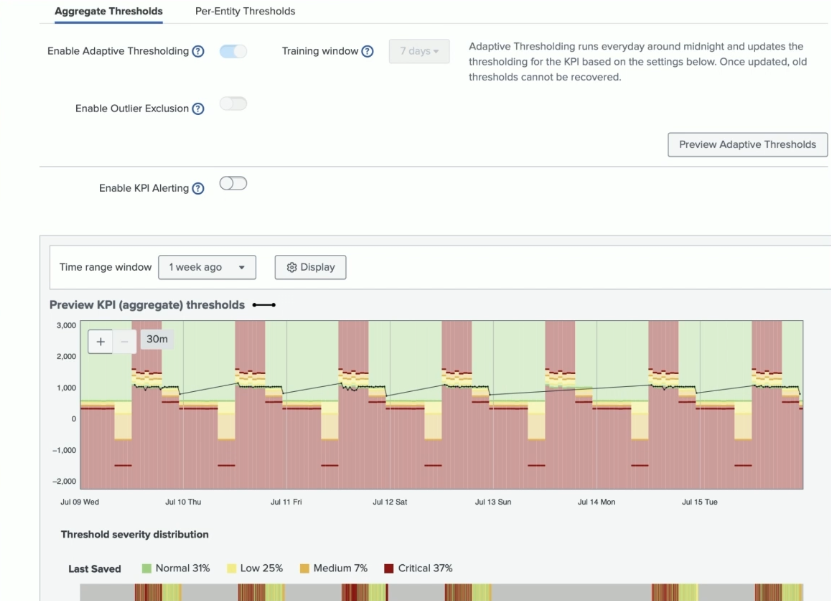
Adaptive thresholding within aggregate thresholds analyzes the combined KPI data over time, learning normal patterns such as daily volume fluctuations or cyclical behavior. This allows thresholds to adjust dynamically, reducing false alerts during expected variations. In the screenshot below, adaptive thresholding has been enabled, showing how the threshold adapts to fluctuations over time.
Per-entity thresholds
Per-entity thresholds apply thresholding rules individually to each entity within a KPI. This allows detection of anomalies at the entity level, such as a single server or pod experiencing issues, even if the aggregate KPI remains healthy.
Prior to ITSI 4.21, per-entity thresholds were by default static and less flexible than aggregate thresholds, requiring configuration for each entity or applying the same threshold across all entities. The screenshot below shows configuration of per-entity threshold values within these older versions of ITSI, where you set static values for the thresholds that apply to the entities within a KPI.

Using static per-entity thresholds can lead to challenges when entity values vary widely, as thresholds must accommodate the full range, potentially causing excessive alerts. The screenshot below shows an example of where per-entity static threshold configuration won't be helpful, as the entity values span a wide range from single digits to the thousands.

Per-entity adaptive thresholding is a new feature introduced in ITSI 4.21 which applies adaptive thresholding individually to each entity within a KPI. Instead of a single threshold for all entities, it learns and sets thresholds tailored to each entity’s normal behavior.
Per-entity adaptive thresholding accommodates wide variances in entity metrics by setting different thresholds per entity. This improves alert accuracy by reducing false positives caused by uniform static thresholds.
Next steps
These resources might help you understand and implement this guidance:
- Splunk Lantern Article: Maintaining adaptive thresholds
- Splunk Lantern Article: Knowing proper adaptive threshold configurations
- Splunk Help: Scenario: Apply adaptive thresholds to a KPI and detect outliers