

Workflow updates in Splunk Enterprise Security 8.3 Premier
Splunk Enterprise Security (ES) 8.3 Premier introduces enhancements that improve analyst efficiency, expand automation, and strengthen detection and investigation workflows across the SOC.
This article highlights the key changes since ES 8.1 and builds upon the ES 8 Updates for the Splunk SOC course, focusing on features available in the ES Premier 8.3 edition.
ES 8.3 is available as ES Essentials and ES Premier. This article applies only to ES Premier. For Essentials, visit Workflow updates in Splunk Enterprise Security 8.3 Essentials.
ES Premier 8.3 overview
ES Premier 8.3 is a cloud and on-premises solution that includes native SOAR (v7.1), integrated UEBA (v1.4), Threat Intelligence Management (TIM) and the new Security AI Assistant, which provides guided, AI-assisted investigation and triage workflows directly within ES.
For more information on the different editions of ES 8.3, see Overview of Splunk Enterprise Security editions.
Mission Control enhancements
ES 8.3 introduces usability improvements to Mission Control and the analyst queue.
Simplified navigation
Updated navigation buttons allow analysts to switch between Investigations, finding groups, findings, and all types directly from the analyst queue filters section. For more information, see Sort and filter findings and investigations for triage in Splunk Enterprise Security.

Views menu
The previous dropdown menu is replaced with a Views menu that improves discoverability with default views as well as custom views. Analysts can manage custom views by going to Saved views > Manage saved views. For more information, see Manage saved views to display findings and investigations in Splunk Enterprise Security.

Nested findings
Findings and finding groups added to an Investigation are now nested under that Investigation and removed from the analyst queue as standalone entries. This hierarchy reduces noise and helps analysts maintain context during complex Investigations. For more information, see Manage analyst workflows using the analyst queue in Splunk Enterprise Security.

Entity risk score enhancements
ES 8.3 implements Entity Risk Score (ERS) which builds on the original Splunk Enterprise Security risk score by continuously assessing the overall risk of an entity, such as a user or asset. ERS aggregates findings from the previous seven days, normalizes the score to a 0 - 100 scale, and recalculates risk using the Risk – EWA Entity Risk Score Calculation scheduled search, which runs every 20 minutes by default. For more information, see Entity risk scoring in Splunk Enterprise Security.
New entity risk score calculation details dashboard
Selecting a risk score in the analyst queue opens the Entity risk score calculation details dashboard. This dashboard provides visibility into:
- Current entity risk score
- Risk contributions
- Associated detections and findings
- Asset and identity attributes
- Contributing MITRE ATT&CK tactics
Analysts can pivot directly to UEBA entity analysis for deeper behavioral context. UEBA is covered later in this article.
For more information, see Risk scoring in Splunk Enterprise Security.

Finding details panel improvements
Field pinning
Analysts can pin important fields in the finding or investigation details panel, as well as in an investigation. Pinned fields remain visible at the top of the panel for faster access during triage.

Expanded entity context
When entities are configured in both detections and in Assets and Identities, additional entity metadata appears in the finding details, including business unit, category, priority, and entity type. For more information, see Pin fields for findings and investigations in Splunk Enterprise Security.
Threat intelligence summary
A new Threat Intelligence section summarizes related threat actors, malware, MITRE tactics, and CVEs to provide immediate context. For more information, see Manage analyst workflows using the analyst queue in Splunk Enterprise Security.

Investigation workflow updates
Clearer navigation
The View details button is renamed to View investigation, making the action explicit.

Intermediate findings visibility
Investigations containing intermediate findings now display a dedicated section on the Overview tab. Analysts can review:
- Event timelines
- Threat topology (relationships between risk and threat objects)
This view improves situational awareness and helps identify related impacts across identities and assets.
For more information, see Access the intermediate findings timeline to review findings in Splunk Enterprise Security.
Threat Intelligence Management (TIM)
ES Premier 8.3 continues to use the Threat Intelligence Framework while introducing Threat Intelligence Management (TIM) to expand and operationalize threat intelligence at scale. With TIM, Splunk Enterprise Security integrates with the Threat Intelligence Management Cloud to provide access to a broader set of threat intelligence sources.
TIM automatically sends observables identified in findings and Investigations—such as IP addresses, domains, and file hashes—to the TIM Cloud service for enrichment. The returned intelligence is embedded directly into Investigations, giving analysts immediate context about potential threats without leaving the workflow.
By correlating threat indicators with internal security events, Threat Intelligence Management (TIM) helps:
- Enrich findings with actionable intelligence context
- Reduce alert noise by prioritizing activity associated with known threats
- Identify malicious indicators faster, accelerating investigation and response
TIM requires full configuration in Splunk Enterprise Security. See the Threat Intelligence configuration documentation for details.

Security AI Assistant
The Security AI Assistant provides guided workflows inside findings and Investigations to reduce analyst workload.
Splunk supports both native and frontier large language models. Customer data is not stored, used for training, or processed outside Splunk infrastructure.
Supported capabilities
- Finding summaries
- Automated Investigation reports
- SPL generation
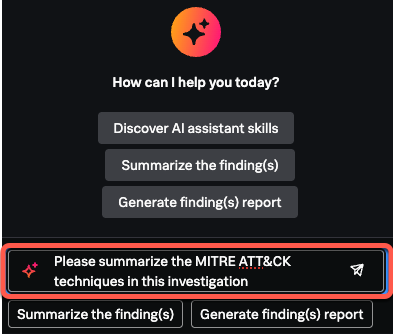
- MITRE ATT&CK analysis
- Suggested triage actions
- Context-aware Investigation Q&A
Analysts can use guided workflow buttons or submit free-form questions using Ask me anything about security. AI responses are generated in the context of finding and Investigation data.
For more information, see AI Assistant in security and agentic capabilities
Detection engineering enhancements
Detection editor navigation
The Event-based detection editor includes an updated navigation menu for faster access to configuration sections.
Test detection (Beta)
Beta features are provided "as is" and might change or be discontinued at any time.
Detection testing allows engineers to test event-based detections without enabling them. Engineers can validate search logic, scheduling, and entity extraction before deployment.
Testing supports 24 hours, 7 days (default), or 30 days of data. Results include:
- Finding volume
- Intermediate findings
- Entity matches
- Omitted results
A Top 5 entities view highlights frequent matches to help reduce noise.
For more information, see Use detections to search for threats in Splunk Enterprise Security.

Detection version comparison
With Detection Versioning enabled, the Diff comparison feature allows engineers to compare detection versions from ESCU or Splunk Enterprise Security. This helps identify outdated detections, review manual changes, and troubleshoot false positives.
Diff comparison displays read-only, side-by-side results in .conf format and highlights the differences between versions.
For more information, see Use detection versioning in Splunk Enterprise Security.

Integrated UEBA
UEBA is fully integrated with ES Premier and uses machine learning to detect:
- Insider threats
- Compromised accounts
- Lateral movement
- Abnormal behavior
UEBA continuously baselines normal behavior and adapts over time to surface anomalous activity that traditional detections might miss.
UEBA dashboards and entity analysis
The UEBA overview dashboard provides a consolidated view of risk events across ES, UEBA, and third-party sources. The UEBA overview dashboard is accessed through the Analytics menu.

From the UEBA overview dashboard, analysts can drill into entity-specific analysis to review risk scores, relationships, detections, and MITRE ATT&CK mappings in the UEBA entity analysis dashboard. Here, analysts can easily create an ES investigation using the Start investigation button.

Entity lists in UEBA
ES administrators can create entity lists in UEBA to help analysts filter dashboards and focus analysis on specific users, hosts, or devices relevant to an Investigation. Entity lists reduce noise by narrowing the behavioral context analysts review during triage and investigation.
Entity lists define sets of entities that can be included or excluded from UEBA dashboards and detections. Common use cases include:
- Focusing dashboards on entities of interest
- Excluding known safe or low-priority entities
- Reusing curated lists for ongoing monitoring or comparison
When applied, entity lists dynamically update UEBA dashboards to show only matching entities. This helps analysts investigate faster, gain clearer behavioral insights, and triage activity more efficiently.
ES administrators can configure entity lists in Configure > UEBA.
For more information, see User and entity behavior analytics (UEBA) overview in Splunk Enterprise Security.
Integrated SOAR
As in ES 8.1, Splunk SOAR integrates directly with ES Premier 8.3 to automate investigation and response workflows. Analysts can run playbooks from the analyst queue, and administrators can configure automation rules to trigger playbooks automatically when detections generate findings.
For more information, see Automate your investigation response with actions and playbooks in Splunk Enterprise Security.
Additional resources
The following resources might help you understand and implement this guidance:
- Splunk Education: ES 8 updates for the Splunk SOC
- Splunk Resource: ES Premier 8.3 click-through demo
- Splunk Help: Splunk ES 8 documentation
- Lantern Article: Tuning Enterprise Security assets & identities