

Improving SOAR playbook design
Splunk SOAR playbooks are a great way to automate security workflows so that analysts can spend more time performing analysis and investigation. However, if you aren't following best practices for designing and deploying playbooks, you might run into some of these issues:
- Large playbooks that are hard to manage and debug
- Using the wrong playbook type for the circumstance
- Playbooks that take too long to finish and limit your automation throughput
This article describes practical steps you can take to avoid these issues.
How to use Splunk software for this use case
Create modular playbooks
Small playbooks have many benefits:
- Load faster
- Likely finish faster
- Can be debugged easier because they have fewer dependencies
- Understandable by others to make collaboration easier
The best practice is to create playbooks with:
- No more than 15-20 blocks
- No more than 3-5 branching paths
- Documentation for every block
So what can you do if you have large playbooks with 50, 60, or 100 blocks?
First, you will have to analyze your playbooks to determine which should be split up. Playbooks with sub-playbooks are easy to start with. If an action can be run in multiple use cases, it shouldn't be a sub-playbook. For example, who interacted with an email or who received a file are good data points for a phishing investigation, but they can also be used in many other investigations. Therefore, they should be separate playbooks.
After you have identified which playbooks need refactoring, the process to create new, independent playbooks in SOAR 6.4.1 is easy. This SOAR version gives you the ability to copy and paste blocks, while preserving data paths and configurations. For more information, see Copy and paste playbook blocks.
Use custom functions
There are lots of custom functions available. Here are two that you might find especially useful.
Use list_demux to automate multivalue fields
You cannot put multivalue fields into an action because the action converts the list into a string and then doesn't know what to do with it. The community function list_demuxconverts the items in a list into objects that SOAR understands how to automation against. So a list such as finding:consolidated_findings.src_ip = [1.1.1.1,2.2.2.2, 3.3.3.3, 4.4.4.4]becomes four separate objects:
[
       list_demux_1:custom_function_result.data.output = 1.1.1.1,
       list_demux_1:custom_function_result.data.output = 2.2.2.2,
       list_demux_1:custom_function_result.data.output = 3.3.3.3,
       list_demux_1:custom_function_result.data.output = 4.4.4.4
]
Use List Zip to combine results
How can you link multiple upstream action blocks together in a single action block? For example, if you have a playbook with 3 action blocks, and 5 values come into that playbook, if the final action is to create a ticket, you'll end up with 125 tickets (5^3).
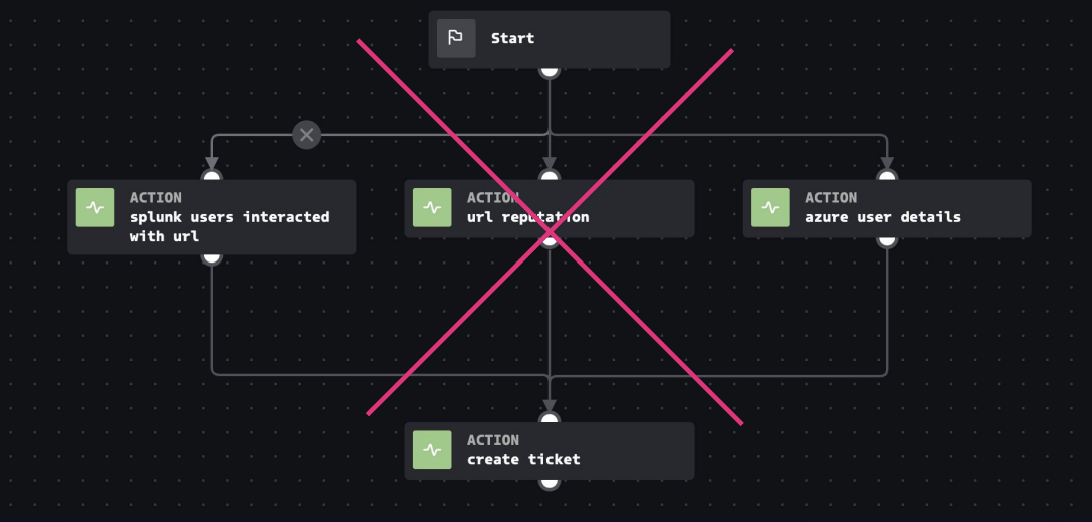
List zip, another custom function, can link lists of multiple sizes into a uniform number of custom function results. In our example, adding the list_zip utility leaves us with only five tickets total, one for each user.

Use loops Wait-and-retry use cases
If you are running an action such as a detonation action, it could be analyzing ten resources or hundreds. This means that previously you need custom code to run the action again or check the status. Loops are a much easier way to do this. They allow you to configure retry loops - how many times, how long between tries, and when to time out - for these actions. For more information, see Understanding loop state.
If you want to retry to see a value try. This is appropriate for uses cases when you want to retry in less than four hours.
Use the Runner and Timer apps
Be sure to check out the SOAR Community apps on Splunkbase. You'll discover many more ways to simplify and improve your use of automation. Here are two that you might want to check out:
- The Runner app lets you schedule playbooks to run through artifact creation.
- The Timer app creates an empty container for automation to run on. This lets you run a playbook when there is no initiating event.
Use the right formatting option
When should you use formatted input versus format blocks for the data you want to bring into a playbook?
The formatted input toggle is great if you want to pass in a list one time or pass in a single value.

The format block is best if you want to pass in a note multiple times for a specific item in a list? Formatting data gives you all the output at a single time, while formatted data.* outputs the format separately for each item found.
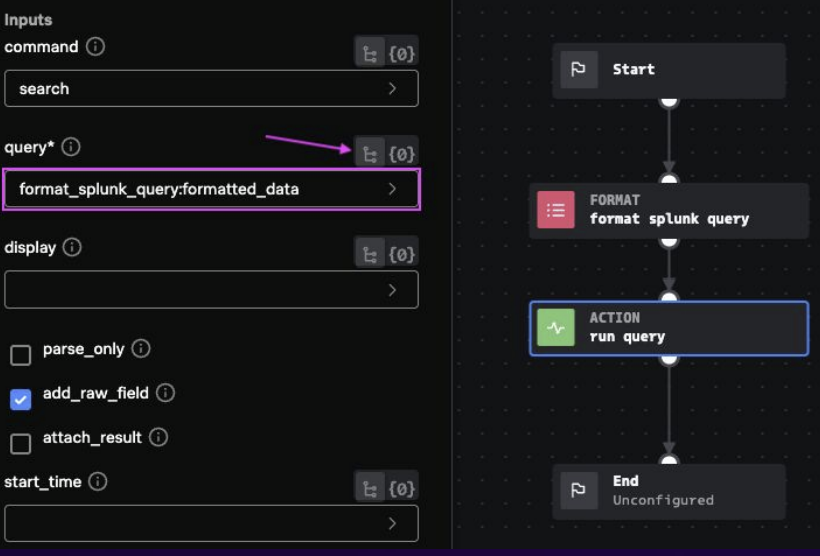
Use the data preview in the Visual Playbook Editor
Data preview allows you to visualize the data without needing to have another tab open for creating the playbook. By eliminating switching between tabs, you get all these benefits:
- Shows real output for any block and container/finding data
- Shows debug logs filtered for that block
- Lets you copy data paths for configuration into different blocks on the canvas
- Lets you add quick actions to the Visual Playbook Editor.
Additional resources
Now that you have an idea of how you can use SOAR to help with automation, watch the full .conf25 talk, (Best) practices make perfect: Automating smarter, not harder with Splunk SOAR. In the talk, you'll hear about real customer use cases with some of these best practices and see a demo of data preview in action. You'll also learn how to work with the SOAR community.
In addition, the following resources might help you implement the guidance in this use case:
- Splunk Help: Copy and paste playbook blocks
- Splunk Help: Create a new playbook in Splunk SOAR (On-premises)
- Splunk GitHub: SOAR (Phantom) playbooks
- Splunk Lantern Article: Developing SOAR use cases using workbooks and playbooks
- Splunk Lantern Article: Understanding playbook types in Splunk SOAR