

Performing data exploration and statistical analysis with Federated Search for Amazon S3
You rely on a strong cloud infrastructure, but subtle threats are always present. One day, your security team hears from a peer about a sophisticated attack campaign that develops slowly over months or even years. The attackers operate quietly, blending in with normal traffic and leaving only small anomalies across logs such as WAF, VPC flow, CloudTrail, and authentication records.
To uncover hidden risks, your SecOps team needs to analyze years of data, searching for unusual spikes in cloud access at odd hours, failed logins from new regions, or strange firewall activity. Traditionally, this would require exporting and ingesting huge amounts of historical logs from S3 into the Splunk platform—a process that is both expensive and time consuming.
To see this use case in action, open the click-through Demo: Federated Search for Amazon S3 use cases and select the Data Exploration & Statistical Analysis use case.
Data required
How to use Splunk software for this use case
With Splunk Federated Search for Amazon S3, you can search years of archived data directly in S3, running advanced analysis without moving any data. Searches you can run include:
- ► Hourly login failures over the last 3 years
-
This search analyzes failed login events from S3 CloudTrail logs over a three-year period, bucketing them daily, to identify long-term trends, average failures, and significant deviations.
| sdselect eventtime eventname eventsource errorcode errormessage sourceipaddress awsregion useragent recipientaccountid requestid eventid useridentity FROM federated:flaws_cloudtrail_parquet_logs WHERE eventname = "ConsoleLogin" AND eventsource = "signin.amazonaws.com" AND errormessage != ""
| eval _time = strptime(eventtime, "%Y-%m-%dT%H:%M:%SZ")
| bucket _time span=1d
| stats count AS failed_logins, dc(sourceipaddress) AS unique_source_ips, dc(useridentity) AS unique_users, values(errormessage) AS error_messages BY _time awsregion
| eventstats sum(failed_logins) AS total_failed_logins, avg(failed_logins) AS avg_failed_logins_per_bucket,
| eval percent_of_total = round((failed_logins / total_failed_logins) * 100, 2)
| eval deviation_from_avg = failed_logins - avg_failed_logins_per_bucket
| sort - _time_time
The search returns results that look like this:

- ► Identify unusual traffic by protocol
-
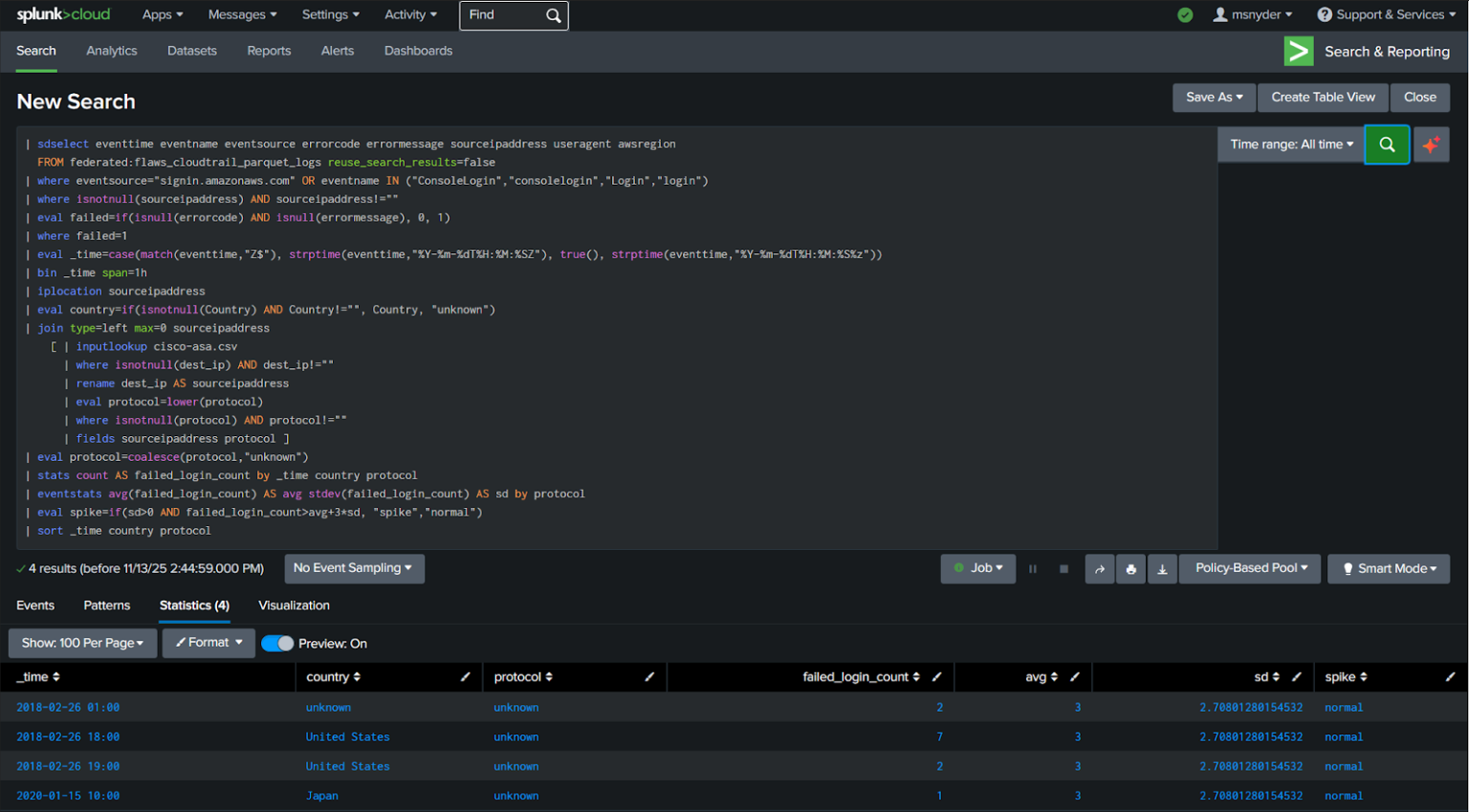
This search detects spikes in failed logins based on protocol and country by combining S3 CloudTrail data with firewall logs, calculating statistical averages and standard deviations to flag anomalous activity.
| sdselect eventtime eventname eventsource errorcode errormessage sourceipaddress useragent awsregion
FROM federated:flaws_cloudtrail_parquet_logs reuse_search_results=false
| where eventsource="http://signin.amazonaws.com/" OR eventname IN ("ConsoleLogin","consolelogin","Login","login")
| where isnotnull(sourceipaddress) AND sourceipaddress!=""
| eval failed=if(isnull(errorcode) AND isnull(errormessage), 0, 1)
| where failed=1
| eval _time=case(match(eventtime,"Z$"), strptime(eventtime,"%Y-%m-%dT%H:%M:%SZ"), true(), strptime(eventtime,"%Y-%m-%dT%H:%M:%S%z"))
| bin _time span=1h
| iplocation sourceipaddress
| eval country=if(isnotnull(Country) AND Country!="", Country, "unknown")
| join type=left max=0 sourceipaddress
[ | inputlookup cisco-asa.csv
| where isnotnull(dest_ip) AND dest_ip!=""
| rename dest_ip AS sourceipaddress
| eval protocol=lower(protocol)
| where isnotnull(protocol) AND protocol!=""
| fields sourceipaddress protocol ]
| eval protocol=coalesce(protocol,"unknown")
| stats count AS failed_login_count by _time country protocol
| eventstats avg(failed_login_count) AS avg stdev(failed_login_count) AS sd by protocol
| eval spike=if(sd>0 AND failed_login_count>avg+3*sd, "spike","normal")
| sort _time country protocol
The search returns results that look like this:
- ► Trend analysis for top attackers
-
This search identifies the top 20 source IP addresses with the most login attempts from S3 CloudTrail logs, providing insights into frequently active IPs, their associated AWS regions, and user agents.
| sdselect eventtime eventname eventsource sourceipaddress awsregion useragent FROM federated:flaws_cloudtrail_parquet_logs reuse_search_results=false LIMIT 1000000
| where (eventsource="http://signin.amazonaws.com/" OR eventname IN ("ConsoleLogin","consolelogin","Login","login"))
| where isnotnull(sourceipaddress) AND sourceipaddress!=""
| stats count AS login_count values(awsregion) AS regions values(useragent) AS useragents BY sourceipaddress
| sort - login_count sourceipaddress
| head 20
The search returns results that look like this:

Next steps
In just a few hours, you spot a subtle pattern: every few months, a few accounts try to access a new region, combined with bursts of failed logins and odd outbound firewall traffic. This finding turns a hidden threat into an actionable case. You notify leadership, block suspicious accounts, and update monitoring policies to prevent similar attacks. Historical logs, previously hard to analyze, have now become a valuable resource for proactive defense and smarter decisions.
To get started, sign up for the Federated Search for Amazon S3 free trial.
In addition, these resources might help you understand and implement this guidance:
- Splunk Help: About Splunk Federated Search for Amazon S3
- Splunk Lantern Article: Leveraging Federated Search for Amazon S3 for key security use cases
- Splunk Lantern Article: Using Federated Search for Amazon S3 for monitoring and detection
- Splunk Lantern Article: Partitioning data in S3 for the best FS-S3 experience
- Splunk Lantern Article: Using Federated Search for Amazon S3 with Edge Processor
- Splunk Lantern Article: Using Federated Search for Amazon S3 with ingest actions