

Building a SOAR playbook to leverage lookup tables
While SOAR custom lists (On-Premises/Cloud) are very powerful, they have limited out-of-the-box functionality. There is an assumption that the playbook developer will write a custom function in Python to handle their data. However, anyone who’s ever had to write Python code in Splunk SOAR to manage a custom list has probably thought that using a Splunk lookup table would be much easier. A SOAR playbook that leverages Splunk lookup tables instead can simplify this process and have the benefit of having a single source of truth for the data.
This article assumes that you are already familiar with using SOAR playbooks to run eval functions. If not, see this page on SOAR eval functions and then come back to this article. This page is also an extension of the user-focused security investigation playbook example, which you might want to review first.
How to use Splunk software for this use case
This use case builds an additional branch for a user investigation playbook to check if their sources are known or trusted, with the definition of ‘trust’ being based on a lookup table that contains an IP address and a description. This sample playbook uses two demo containers in which one user has an approved IP and is deemed safe, while the other does not. Here are the components:
First, write your SPL to search for the users' activity and cross-check the information against the lookup table. If this process isn't familiar, see the detailed explanation on this page on how to achieve this.

Pass the SPL from the format block into an action block with a leading | tstatscommand.

The automation searches for the two demo users, admin and pwny, for this example, each using a unique source (src) ip-address. Note how the result column in the table is a binary (0/1) condition. This is used by the upcoming decision block.

As we previously configured a binary output from our previous search, we can now use the two possible outcomes (known or unknown) based on the returned to dynamically choose a branch from which the next steps in the playbook can be invoked.

For unknown sources, have an analyst review the information and determine if the source is trusted and should be added to the known list. The analyst should add their reasoning to provide context for later on.

We can now configure a path based on the prompt response. In this example use case, we have selected Yes to add the unknown user to the known user lookup table.

To manipulate the lookup table, we can write the SPL to create a search that will output into the lookup table with the | outputlookupcommand.
In this case, the full search would be presented as:
| makeresults
| eval src="{0}", decription="{1}"
| table src, description
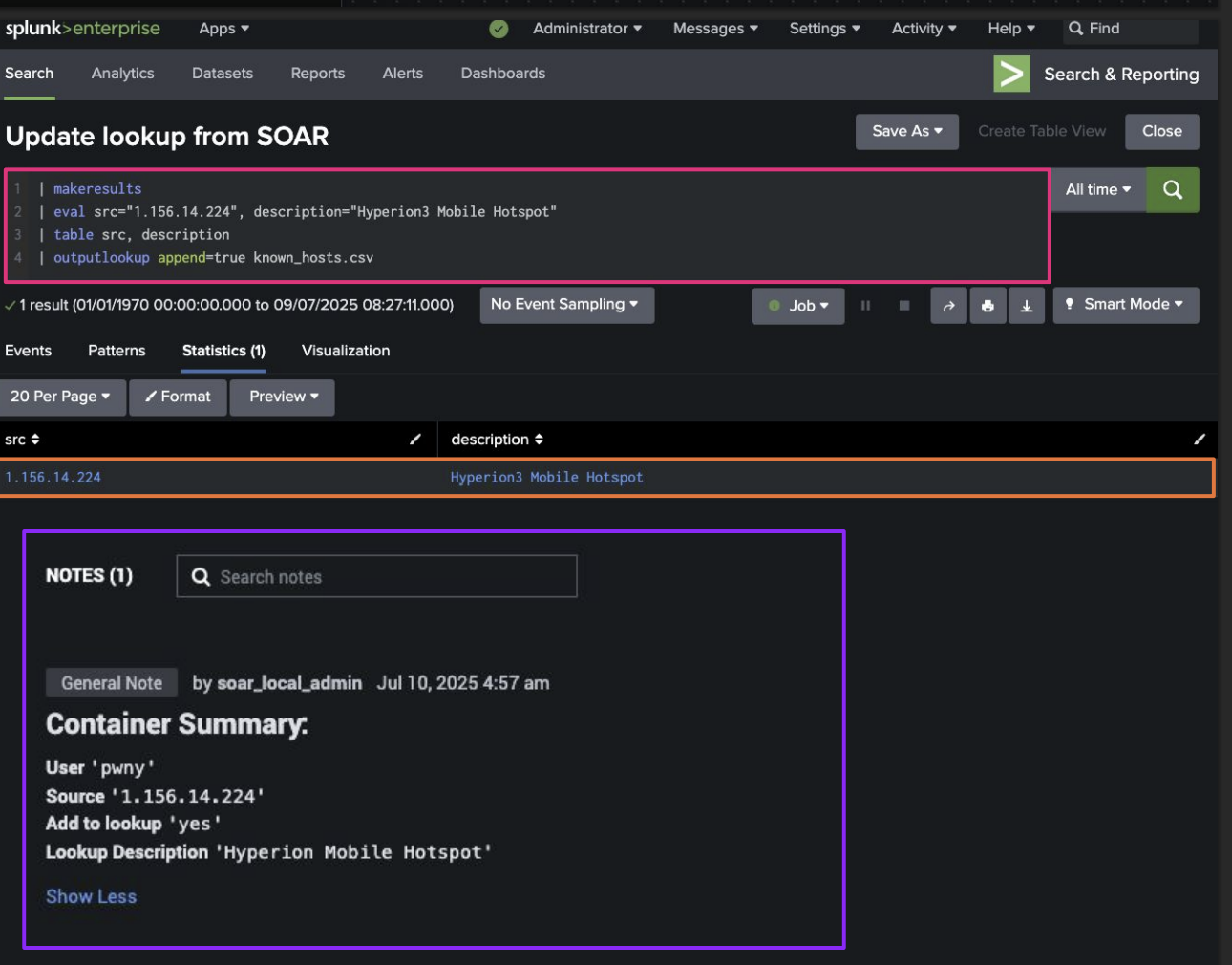
| outputlookup append=true known_hosts.csv

We can now pass this SPL into an action block with a leading |makeresultscommand.

After running this branch, the data is written to a Splunk lookup table from within SOAR with zero custom code. Additionally, SOAR is updated with the same information.
The following screenshot shows a representation of how this search would look from the perspective of the Splunk instance, as well as the container summary after the lookup table as been appended.
Additional resources
This article is one of many in a series on using SOAR automation to improve your SOC processes. Check out the additional playbook guidance or some of the links below to continue getting more value out of Splunk SOAR.
- Splunk Lantern Article: Applying useful SOAR playbook design features
- Splunk .Conf: Practical SOAR examples from the field
- Splunk .Conf: Practical SOAR examples from the field: Part 2